
A free quiz app for students — practise until it sticks.
Quizoma is a free quiz app for students and teachers. Join your teacher's quiz with a 6-character code, or turn your own notes into practice tests that show the right answer straight away and let you retake them as often as you like. No ads, nothing to pay.
 Inside QuizomaExample screens
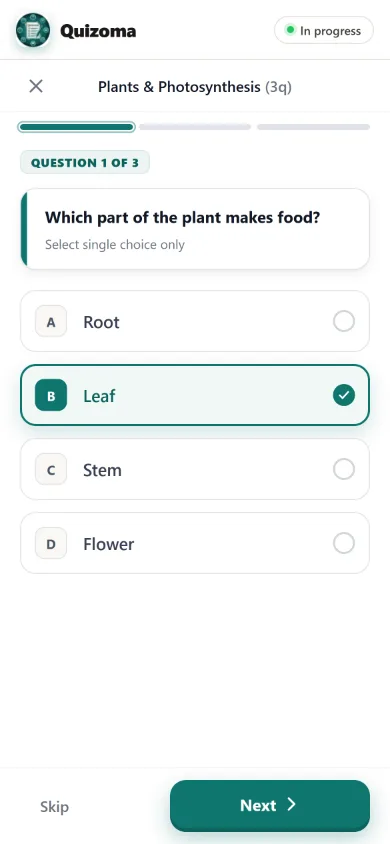
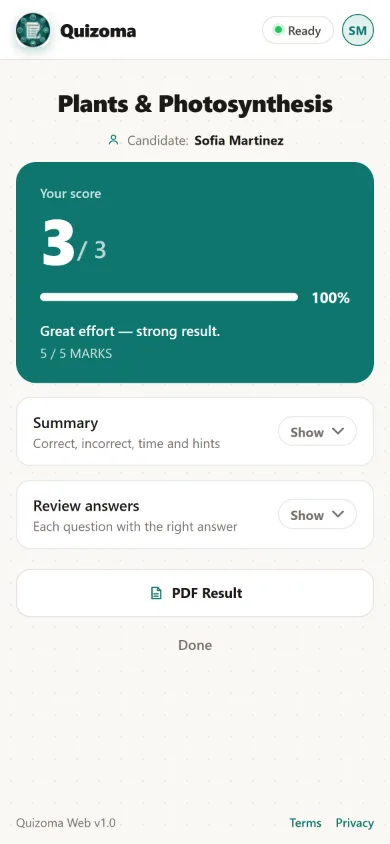
Answer in the browser, then review your result when it is available.
Choose an answer and move to the next question.
Two ways students use Quizoma
- Taking a quiz your teacher set. Open quizoma.com/take in any browser, type the code, sign in with Google or email and start. Nothing to install. Your teacher decides when you see your score — straight away for practice, or after the test closes.
- Making your own practice tests. Write questions from your notes, or import a list of them, and quiz yourself before an exam. This is where Quizoma works as a study app rather than just a test tool.
How to make a practice test for revision
The settings that turn a quiz into revision practice are all one tap each:
- Show Score & Result — you see your score and the full answer sheet the moment you submit.
- Retake Allowed — take it again as often as you want. Repeating a quiz is one of the fastest ways to move facts into long-term memory.
- Instant Correctness Flash — each answer flashes green or red as soon as you pick it, with the right one shown before the next question.
- Hints and explanations — add a hint to a hard question and a short reason that appears afterwards, so a wrong answer still teaches you something.
Choose the Practice preset for instant feedback and scores, then turn on Retake Allowed yourself: it is off by default. Hints and explanations are added per question. If your teacher created the quiz, ask them to enable retakes. A question timer is optional when you want exam-style pressure.
Revising for Matric or FSc? Start from ready-made sets with answers: 9th class physics MCQs, 9th class chemistry MCQs, 10th class biology MCQs, FSc Part 1 physics MCQs and Pakistan Studies MCQs.
Questions that test what you actually know
Multiple choice is quick to revise with, but it lets you recognise an answer instead of recalling it. Quizoma has eight question formats — single choice, multiple correct, true/false, fill in the blanks, drop-down blanks, put in order, written answers and polls — so you can make yourself write the term, not just spot it.
Written answers can be marked fairly: with typo-tolerant grading on, a small spelling slip such as photosynthsis still counts instead of being thrown out for one missing letter. That matters when you are learning a subject's vocabulary — a typo should not hide the fact that you knew it.
Quiz your friends or your study group
Every quiz gets a 6-character code and a QR code. Share it in your group chat and everyone can take it on their own phone or laptop. Each person sees their own score; you, as the maker, see how the group did on every question — which tells you which topic you all need to go over again.
What makes a good quiz app for students
If you are comparing the best quiz apps for students, these are the questions worth asking:
- Is it really free, and without ads? Ads in the middle of a revision session cost focus. Quizoma has no ads and no in-app purchases.
- Can you retake a quiz and see the answers? Practice only works when you find out what you got wrong. Here that is two switches.
- Does it accept a nearly-right written answer? Exact-match marking punishes typing, not knowledge.
- Does it work on the device you have? Quizoma runs in any browser, and the Android app also keeps working when the connection drops.
For a wider comparison of study apps — flashcards, game-style quizzes, form tools — see our guide to the best free quiz apps for students, or the Quizlet alternative page. Ready to start? The practice test maker walks you through it.
Practise with ready-made MCQs
Preparing for Matric or FSc? Try a free online MCQs test by subject — physics, chemistry, biology, computer science, English grammar and Pakistan Studies, each with its answers.
Honest limits
Quizoma is not a flashcard app and it does not write questions for you with AI — you make the questions, which is also part of how you learn them. A free account has a limit on quizzes and on questions per quiz. Creators and participants sign in with Google or email on the web. The Android app is coming soon to Google Play.
Questions
Yes. Taking a quiz and making your own practice quizzes are both free, with no ads and no in-app purchases. A free account has a limit on quizzes and on questions per quiz.
Yes. Make a quiz from your notes, choose Practice and turn on Retake Allowed, which is off by default. You see your score and the right answers after submission, with hints and explanations if you add them.
No. Open quizoma.com/take in any browser, enter the 6-character quiz code and sign in with Google or email. The Android app is coming soon to Google Play.
Yes. Every quiz gets a 6-character code and a QR code. Share it with your group, and everyone who joins sees their own score while you see how the whole group did.