Skip to content
How Quizoma works

Create a quiz.
Let Quizoma mark it.

Write your questions or pick a template. Share the quiz, then see everyone’s answers and scores in one place.

Free · No ads · Google or email sign-in to save.

Here to answer a quiz? Enter your code
Your quiz, step by stepExample
1. CreateYour quiz
Science check-inSingle choice

Which planet is known
as the Red Planet?

A Venus
B Mars ✓
C Jupiter
✓ Answer key ready

Write a question. Choose the right answer. You're on your way.

The basics

Here’s how it works.

See the full demo
01Create

Add your questions

Type questions in Quizoma Studio or the Android app. Add an answer key, then choose timing, feedback and retakes to suit the lesson.

Multiple choiceWritten answersFill in the blanks
See all eight question formats
  • Single choice: one correct option.
  • Multiple correct: select more than one; partial credit is available when enabled.
  • True / false: check a clear statement.
  • Written answer: use an answer key and matching rules, or mark it yourself.
  • Fill in the blanks: set accepted answers for each gap; all gaps must be correct for the question to score.
  • Drop-down blanks: each gap opens a short list; students pick the missing word, marked exactly.
  • Put in order: arrange items in sequence; partial credit is available when enabled.
  • Poll: collect opinions without scoring.
Compare the question formats →
02Share

Send the quiz

Publish when you're ready. Share the quiz link, its six-character code or its QR code. Learners can join in a browser without installing an app.

Link Code QR
Open the join page →
03Answer

Let learners answer

Learners enter the code at quizoma.com/take, sign in with Google or email, and answer on their phone, tablet or laptop.

Practising, not testing?

Choose the Practice preset for feedback. Turn on Retake Allowed if learners should try again.

A connection is needed to join and submit. If it drops, reconnect and check that submission is confirmed.

04Review

See what they understood

With automatic marking enabled, Quizoma scores submitted answers using your answer key and grading settings. Review scores and question accuracy to find what needs more practice.

Check written responses, adjust marks and add comments when needed. Or choose manual marking for the whole quiz. Export a PDF report to keep or share.

See how smart grading works →
Take a closer look

See it before
you make it.

Watch a quiz being created, shared and answered. See both sides: the teacher’s screen and the learner’s phone.

Watch the quiz demoOr watch a template become a quiz →
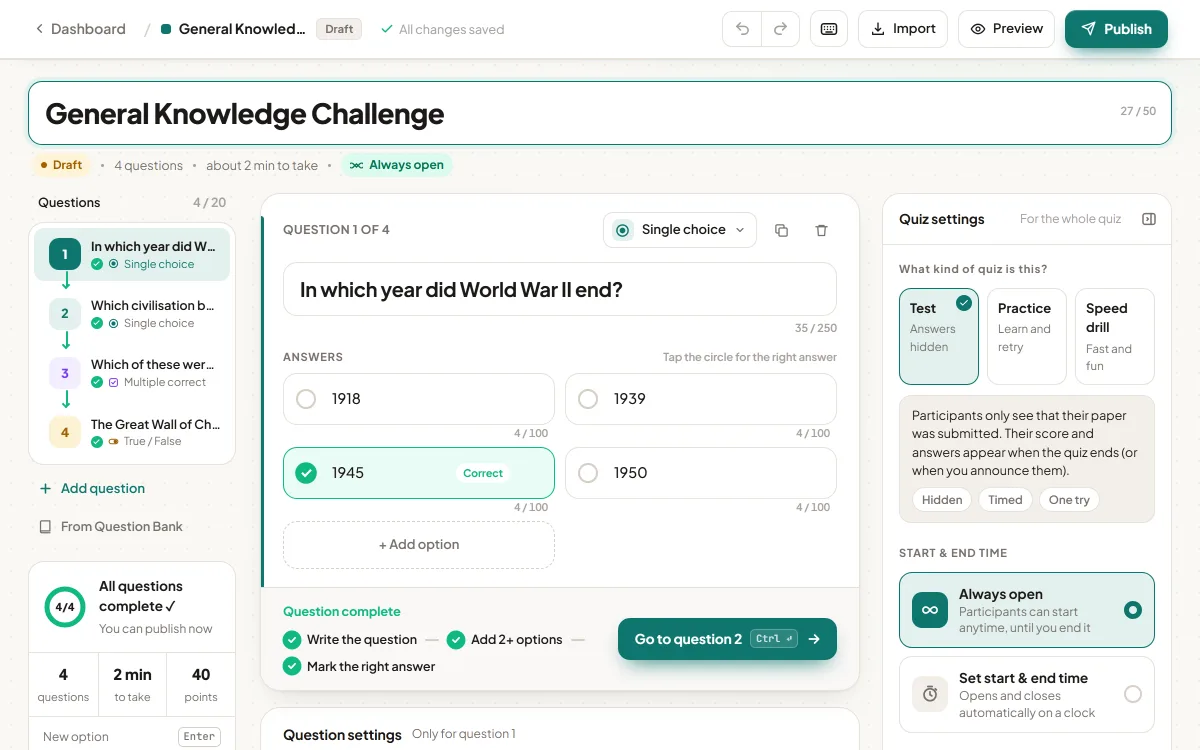
Quizoma Studio · Example screen
Quizoma Studio with a question, answer options and quiz settings.
Ready to make yours?

How would you like to start?

Both paths lead to your own quiz.

Questions already written? Import a TXT or CSV file.   Prefer a walkthrough? Watch the template demo →

Need opinions instead of scores?

For feedback and check-ins, make a survey. Collect feedback without right or wrong answers.

Your turn

Make your first quiz.

Choose the questions. We’ll help with the rest.

A free account has a limit on quizzes and on questions per quiz.