Skip to content
FOR THE WORDS YOU ARE TEACHING

A vocabulary quiz maker for your own word list.

Turn a word and its meaning into a question. Check the learner view, then copy it into Quizoma Studio to build and share your quiz.

Or try one sample question first →
Google or email sign-in is needed to save a quiz in Studio.

ONE WORD → ONE CLEAR QUESTION

evaporate verb

What does “evaporate” mean?

  • ATo change from liquid to solid
  • BTo change from liquid to gas Correct
  • CTo change from solid to liquid

Copy question Studio import Review & publish

Start with a word from your lesson.

A workflow example. Copying does not save a quiz automatically.

TRY ONE QUESTION FIRST

Create a vocabulary question

Replace the example with a word from your lesson. Write its correct meaning and two plausible wrong options. This builder formats your text; you check the facts.

1. Write the word and meanings

Use up to 100 characters for each meaning. Your text stays in this demo until you choose to copy it.

2. Preview and copy

The * marks the correct answer in the import text. It is an answer key for you, not a student question screen.

One single-choice question, ready for Studio import.

3. Move your question into a quiz

  1. Copy the question, then open Studio import and sign in with Google or email.
  2. Choose paste text directly, paste the copied text, give the quiz a title and continue to review.
  3. Check the question and correct option, choose your quiz settings, then save and publish when ready.

Copying does not save or transfer a quiz automatically. To use a longer word list, repeat the question format with an empty line between questions. Default limits are 20 questions per quiz and 10 quizzes per account.

Choose what you want learners to remember

Recognising a meaning, recalling a word and using it in context are different tasks. Choose the format that fits.

RECOGNISE

Choose the meaning

Use single choice for definitions, synonyms or antonyms. Keep one clear best answer. Make distractors plausible and similar in length.

The sample above creates this format. For writing better options, see the multiple-choice question guide.

RECALL

Type the word

Add a written-answer question in Studio when learners should recall a term without options. Choose checking rules carefully: exact spelling and typo tolerance test different things.

See written-answer checking rules →
USE IN CONTEXT

Complete the sentence

Use fill in the blanks to test a word in a sentence. Give enough context for one intended meaning and add acceptable alternatives where appropriate.

Try a sentence with blanks →

From a word list to useful practice

Start with a small set of words from the lesson or a text your learners have read. For each one, write a definition at their reading level. Avoid explaining a difficult word with an even harder synonym.

A question such as “What does bank mean?” can have several answers. Add a sentence or name the intended meaning when a word has more than one use. For a synonym question, check that the options fit the same context.

In Studio, start from the Practice preset if you want immediate feedback and scores. Turn Retake Allowed on yourself if learners should repeat the quiz; it is off by default. Choose Test and check score-release settings for an assessment.

Publish the reviewed quiz and share its 6-character code or QR code. Learners can join in a browser with Google or email. Use the results to pick words to revisit, rather than treating a high score on one attempt as proof of lasting recall.

For a ready-made English word set, use the 200-question vocabulary quiz. It covers synonyms, meanings, idioms and more; this maker page is for writing your own questions.

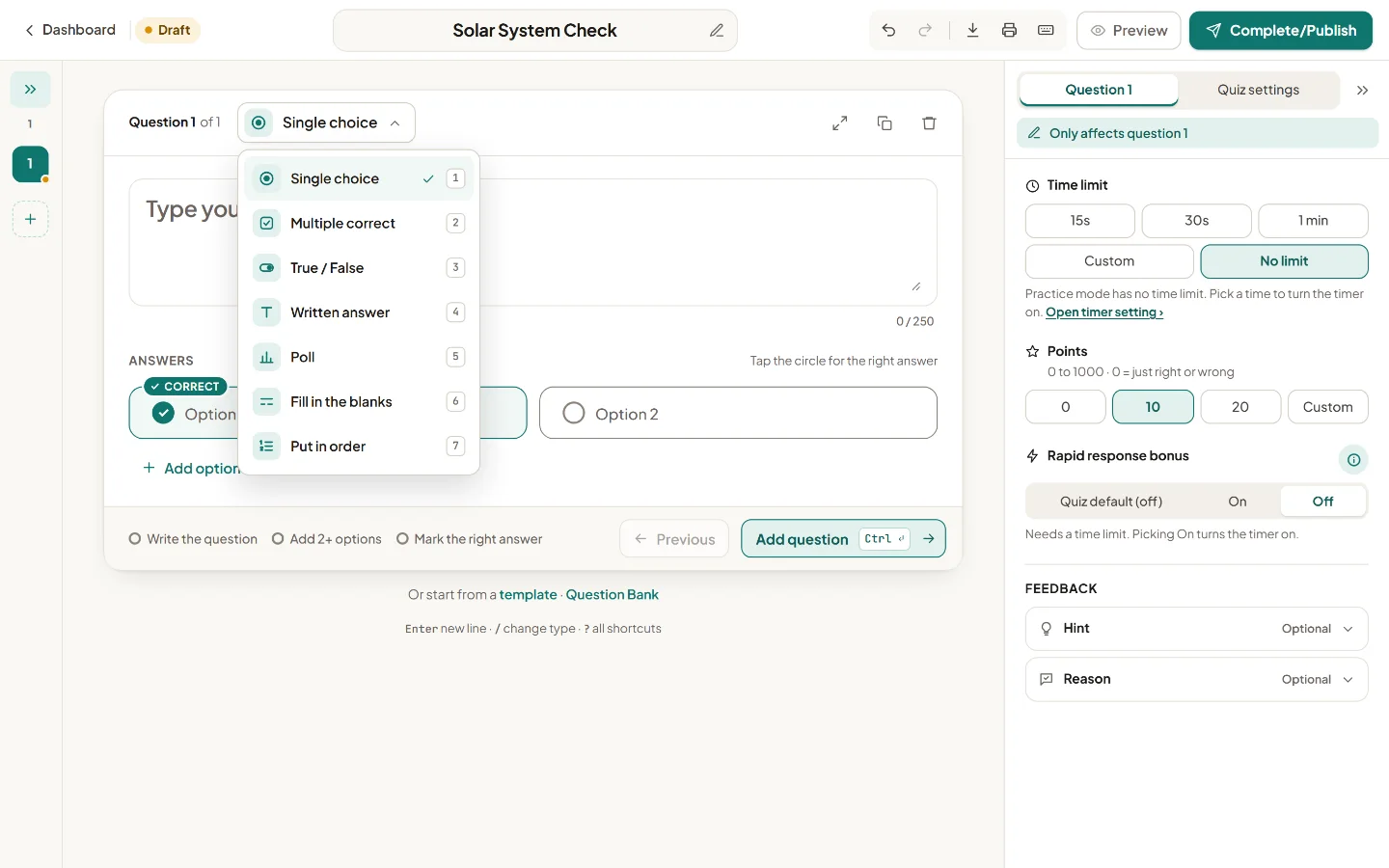
The Quizoma Studio question-format menu showing single choice, written answer and fill in the blanks.
Inside Studio: choose a format for recognition, recall or sentence practice.

Before you start

Can I create a vocabulary quiz for free?

Yes. Quizoma is currently free. This sample builder works without an account; sign in with Google or email in Studio to save and share a quiz. Default account limits are 10 quizzes and 20 questions per quiz.

Does Quizoma generate definitions or distractors with AI?

No. You supply the words, correct meanings and wrong options. The sample builder formats one multiple-choice question for Studio import; it does not check whether your definitions are factually correct.

Can I test spelling instead of recognising a definition?

Yes. In Studio, use a written-answer question when learners should type the word, or fill in the blanks for a missing word in a sentence. Add those formats in the editor; this sample exports single-choice text.